Three things on the desk.
An Interactive Brokers Pro account in US dollars, cash or margin (setup asks which; an IRA with IRA margin counts as margin), with the IBKR app on your phone for the login approvals. Trader Workstation or IB Gateway installed and logged in on this computer; Gateway is the lighter one and does nothing but hold the connection. And the package you were sent, unzipped anywhere you like and left there; everything it writes lives inside that folder.
Open a Terminal in the folder and start setup.
On a Mac, first drag the unzipped folder out of Downloads into your home folder (the one with your name): macOS keeps Downloads, Desktop and Documents private from Terminal. Then right-click the folder and choose New Terminal at Folder. On Windows, Shift-right-click and Open PowerShell here. Then:
Every question shows its default in brackets. Pressing Enter takes the default, and the default is always the cautious one.
It builds itself a private environment.
This is the slow step, and it happens once. It restarts itself inside that environment when it is done.
Connect it to your broker.
It then shows the one setting to turn on in the broker app, Enable ActiveX and Socket Clients, and waits for you. Start with the paper account: it is the same software against pretend money, and the only difference later is which port you type.
It reads the account once here. A base currency other than US dollars stops setup in words, and fractional shares from dividend reinvestment get a warning. A paper account passes both.
Pick an engine.
STEADY is the default and the one to start with. Choosing ULTRA prints its worst historical fall and its worst single day, and asks you to type that you understood; the default answer to that question is no.
Notifications, then the practice size.
On a paper account the amount is a practice size: the reports and the console size on that number, not on the pretend million. On a live account the engine sizes on the real balance and the amount is only a ceiling.
It checks itself and shows you today's plan.
If the check finds a problem, setup stops here and names the fix. It never says "done" over a failure.
Let it run on its own.
The first answer installs the daily run; the second keeps the console page alive so your phone can always reach it. Both can be undone with one command, printed on screen.
Optional, taxable accounts only: where idle cash waits.
While the exit has the engine out of the market, its cash sits in a T-bill fund (SGOV) and earns the bill rate; that interest is taxed as income. In a taxable account you can have it wait in a box-spread fund instead (BOXX). It holds index option positions built to behave like a short Treasury bill, and so far it has paid almost nothing out, so its return has arrived as a rising price and been taxed as a capital gain when sold, at the long-term rate if held more than a year. In our test that recovers most of the fifth of a percent a year that tax on cash interest costs. It is one button on the operator page, Cash parking: BOXX, under "where idle cash waits"; nothing trades when you press it, the next scheduled run moves the cash across.
Said plainly: it uses options, it can pay taxable distributions, and neither its return nor its tax treatment is guaranteed to match a Treasury fund; the treatment rests on how the fund is run, not on the statute. It charges a little more than the bill fund, roughly a tenth of a percent a year, and it is a younger fund whose price can wobble by a few hundredths on a day where the bill fund does not. In a Roth or an IRA there is nothing to gain: leave it on T-bills.
Open My Operator.
Setup leaves a launcher beside the program. Double-click it and the page opens in your browser. It runs on your machine only.
On a Mac, if you started with the Start Here file instead of Terminal, macOS says the first time that it could not verify it. It says that about any download that has not been through Apple’s paid signing. Click Done (not Move to Trash), then open System Settings › Privacy & Security, scroll down and click Open Anyway. You do this once; setup then clears the mark for the whole folder, so the launcher here opens with a plain double-click.
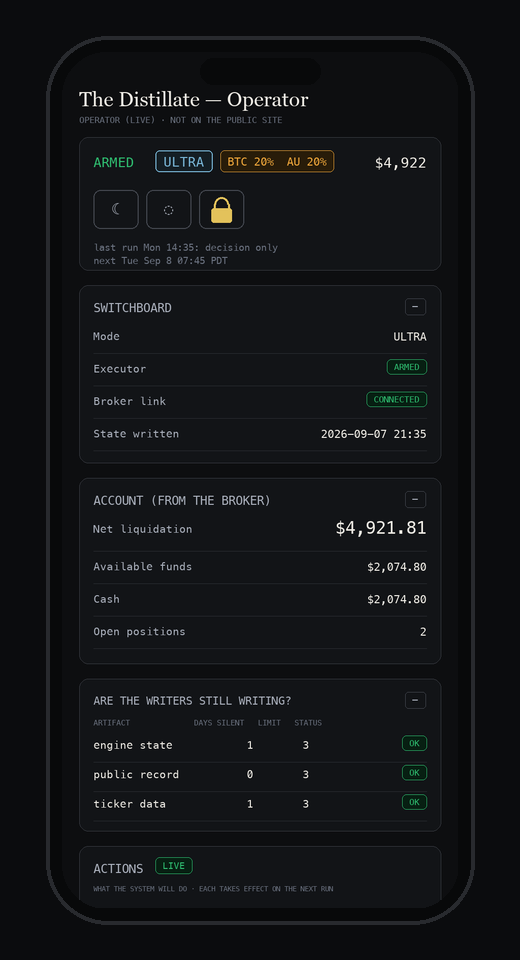
The verdict line answers the only question that matters, is my robot okay, before any number. Below it: today's plan, the health check, the engine switch, and Arm and Disarm behind a lock that asks you to type ARM.
Put it on your phone.
Press Watch from your phone on the operator page. It shows one code. With Tailscale on both devices, that code works from anywhere; without it, it works on your home wifi. Tailscale is free for personal use: install it on this computer from tailscale.com, and on your phone (iPhone · Android), signed in with the same account. Scan it, then add the page to your home screen: iPhone, Share, Add to Home Screen; Android, the three dots, Add to Home screen. The icon keeps working across restarts because the link never changes.
Watch for a week. Then arm.
Most days the right answer is nothing, and you will see that in the reports. When you trust it, arm it. Interactive Brokers signs everyone out about once a week; the console says "Not connected" until you log back in, and the engine refuses to size an order against an account it cannot read.
From paper to real money.
Everything above happens on the paper account, and the operator page says PAPER beside the account value the whole time; once armed there, its verdict reads "Running on paper". Give it at least a week of runs with no "Missed a run", and check that the fills in your broker app match what Today's plan said. Then run setup again and choose the live port; every other answer is remembered. Arm again, because consent to trade the paper account is never consent to trade the real one: the engine refuses to place an order on a connection it was not armed for, and says so. On the live account the practice size no longer applies. It sizes on the real balance, and the funding rules of your account type apply from the first run.
The Distillate is independent software. It is not affiliated with, endorsed by or sponsored by Interactive Brokers; you open and hold your own account, and the software connects to it on your computer.
Stuck? support@10ktrials.com reaches a person. Nothing in this guide is investment advice, and the numbers on the operator page are your account's, not ours.